Accounts & inboxes
At the end of this page the app can sign in to your store account and read the sign-in codes the store emails you.
Tasks sign in with your own store account. Stores often email a one-time code during sign-in; linking the inbox lets the app read that code itself instead of stopping to ask you.
Add a store account
- Click the key icon in the left bar to open Accounts.
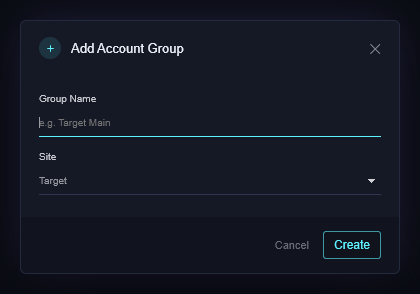
- Click Add Group, give it a name, pick the Site (Target, Pokemon Center, Walmart or Best Buy) and create it. A group holds the accounts for one store.
- With the group selected, click + Add account and type the account's email (or username) and password. The row saves as you type.

The group shows "1 account" in the list on the left, and the row shows your email.
Link an inbox
Sign-in codes arrive by email. The app reads them over IMAP, the same protocol a mail app uses.
- Open Settings (gear icon) and find IMAP inboxes.
- Click + Add inbox. Fill in a name, the mail server, the port (993 is right for almost everyone), the email address, and the password.
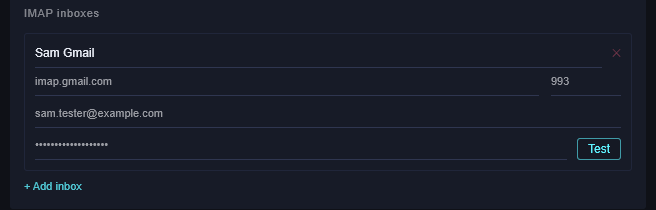
- Click Test. It should say IMAP connected!
- Back in Accounts, set the row's IMAP column to that inbox, or leave it on Auto, which picks the inbox whose address matches the account.
Gmail
Gmail refuses your normal password over IMAP. Use an app password:
- In your Google account, turn on 2-Step Verification (Security → 2-Step Verification).
- Go to App passwords (search for it in account settings), create one named "Ghostline", and copy the 16-character password Google shows you.
- Use
imap.gmail.com, port993, your Gmail address, and that app password.
Other providers
Outlook, Yahoo, iCloud and most others work the same way: turn on two-step sign-in, create an app password, and use the provider's IMAP server (search "
The other columns
- Profile: ties the account to one of your profiles, so a task that picks the account also gets the right address and card. Auto-link by email does this for every account whose email matches a profile.
- Proxy List / Proxy: the connection used by Open browser only. Tasks use their own proxy list.
- Open browser: opens a Chrome window already on the store, signed in with this account, for you to look around or fix something by hand.
- Update billing/shipping: has the app put the profile's address and card into the store account ahead of a drop, so checkout has less to type.
If it didn't work
- Test fails on Gmail: you used your normal password. Make an app password.
- Test fails elsewhere: check the server name (it must be the IMAP server, not SMTP or POP) and that IMAP is turned on in the provider's settings.
- A task shows Waiting For Code for a long time: the code went to an inbox the app can't read. Check the row's IMAP column.
- Still stuck? Open a ticket on Discord.