Task groups & monitor
At the end of this page your tasks sit in a group that can start them all together, on a schedule, or the moment the product restocks.
Groups
Every task belongs to a group. A group is just a name, but it's the thing you start, stop and edit as one.
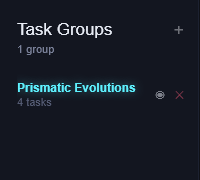
- Click + next to Task Groups to make one. Click a group to show only its tasks.
- Start all / Stop all act on the selected group. Starts are spaced out a little so the store doesn't see them all land at once (Settings → Start All Gap).
- Edit all and Delete all act on the group too (see Create a task).
Schedule a start
For a drop at a known time, let the app start the group for you.
- Click Schedule above the task list.
- Pick the date and time, then click Schedule.
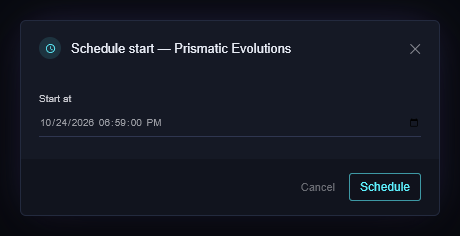
The group shows its scheduled time. The app has to be running at that time; a schedule that passes while it's closed is reported as missed when it opens.
Click Schedule again and Remove schedule to cancel.
The restock monitor
A monitor watches a product for the whole group without a browser, and starts the group's tasks the moment it's in stock. Use it when you don't know when the restock will happen.
- Click the eye icon next to the group's name.
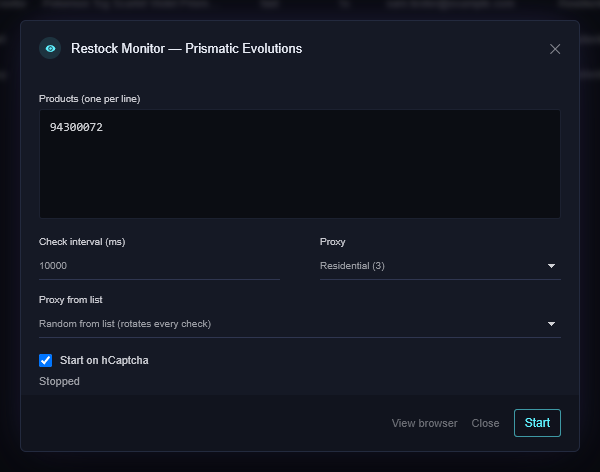
- Products: one per line. A product link, or for Target the item number (the digits after
A-in the link). - Check interval: how often to look, in milliseconds.
10000is ten seconds. Faster isn't better; stores block addresses that hammer them. - Proxy: a list, or your home connection. Proxy from list rotates through it so no single address does all the checking.
- Start on hCaptcha: when the store answers the check with a captcha instead of a page, treat it as a possible restock and start the tasks anyway. On for drops, off for quiet watching.
- Click Start. The dialog shows the monitor's state; Close leaves it running.
The group's eye icon lights up and the dialog says the monitor is running.
When the monitor sees stock, it starts the tasks in the group that aren't already running. Tasks with Allow third-party sellers off are skipped when the restock is from a marketplace seller.
If it didn't work
- The monitor says Blocked or stops: the store is refusing that address. Switch it to a proxy list, or slow the interval down.
- It fired but the tasks didn't buy: the tasks' own pages decide that; check their rows and the Statuses page.
- Still stuck? Open a ticket on Discord.