Install
At the end of this page Ghostline AIO is installed and showing its key card.
Ghostline AIO runs on Windows 10 or 11. A Mac build is coming; it is not part of the alpha.
Steps
- Get the installer. It's a file called
Ghostline-AIO-Setup-<version>.exe. Ask for the download link in the Discord if you don't have it. - Run it. Windows shows a blue box that says "Windows protected your PC". That's because the installer isn't signed yet, not because anything is wrong. Click More info, then Run anyway.
- Wait a few seconds. There are no options to choose. The app installs for your Windows user only and puts a Ghostline AIO shortcut on the desktop and in the Start menu.
- Open it. The first launch shows the key card below. That's where Activate your license picks up.
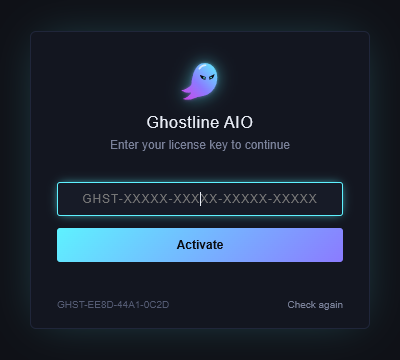
You see the key card with your Machine ID (it starts with
GHST-) in the bottom-left corner.Good to know
- Your data stays put. Profiles, accounts, proxies and tasks live in
%APPDATA%\Ghostline AIO\data, encrypted to your Windows account. Installing a new version over the old one keeps all of it. - Keep Chrome installed. The app drives a normal Google Chrome window. Chrome updating itself is fine.
- Moving to another PC is not a copy job: the data folder only opens on the PC and Windows account that made it. Use Settings → Export All on the old PC and Import All on the new one.
If it didn't work
- No "Run anyway" link: click More info first; the link appears under the message.
- The app opens and closes at once: another copy may already be running. Check the taskbar and the system tray before opening it again.
- A blank dark window with no key card: wait ten seconds, then close and reopen. If it stays blank, send your log file: it's at
%APPDATA%\Ghostline AIO\data\bot\logs\tasks.log.txt. - Still stuck? Open a ticket on Discord.