Settings
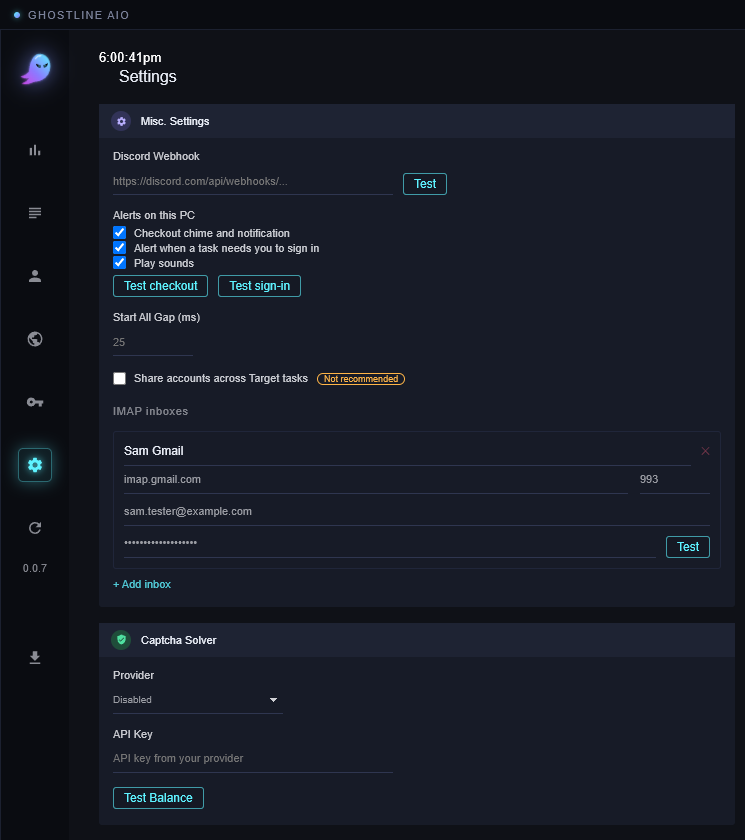
What each part of the Settings view does. Most of it you set once.
The buttons at the top
- Import All / Export All: everything (profiles, accounts, proxies, tasks, settings) in one file. Export before you move to a new PC or reinstall Windows; Import on the new one. The file holds card numbers, so keep it somewhere safe and delete it when done.
- Save: saves Misc. Settings and the captcha settings.
- Clear Orders: empties the order list in Analytics.
- Theme: switches the dashboard between dark and light.
- Open Logs: opens the log file to attach to a ticket (see Troubleshooting).
Misc. Settings
- Discord Webhook: paste a webhook URL from your own Discord server and every successful order (and every Best Buy invite) is posted there. Test sends a sample. Leave it blank to skip.
- Alerts on this PC: a chime and a Windows notification on a successful checkout, an alert when a task needs you to sign in, and whether sounds play at all. Test checkout and Test sign-in let you hear them.
- Start All Gap (ms): the pause between tasks when you click Start all, so twenty browsers don't open in the same instant. Leave it unless a store blocks your first few starts.
- Share accounts across Target tasks: off, one Target account can run on one task at a time; a second task on the same account shows Account In Use. On, several tasks may share an account. It's marked not recommended because tasks sharing a cart fight over it.
- IMAP inboxes: see Accounts & inboxes.
Captcha Solver
See Pokémon Center. Pick a provider, paste its key, Test Balance.
License
See Activate your license. This is also where your Machine ID is.